Add two portraits.
Use one clear photo per person: one in the male slot and one in the female slot. Choose JPG, PNG or WebP, up to 10 MB each and at least 300 × 300 pixels. Use photos you have permission to use.
 raindanceaiSign in
Upload a male portrait and a female portrait. Choose a 10-second part of the waterfront performance. The built-in reference and prompt guide the same scene and movements with your two identities.
Reference preview is available. Personalized generation and purchases are not open yet.
Only the selected 10-second section is used for generation. The scene, cuts and movement stay guided by this reference.
Clear faces, one person per photo. JPG, PNG or WebP · Max 10 MB. Male photo → male performer. Female photo → female performer, across every cut and position change.
Part 1 · 0:00–0:10One part → one 10-second video
Identity replacement follows the reference; AI likeness, motion and audio fidelity can vary.
Raindance AI refers to photo-to-video recreations inspired by “Raindance” by Dave featuring Tems. In this two-person version, your portraits guide the identities in a waterfront performance with pier scenes, solo close-ups and shared shots.
Our studio supplies the reference and fixed prompt. Upload two separate portraits, assign the male and female roles, then choose the part you want to recreate.
Universal Music Canada announced the official music video on January 9, 2026, and identifies Lagos, Nigeria as its filming location.
Read the official music video announcement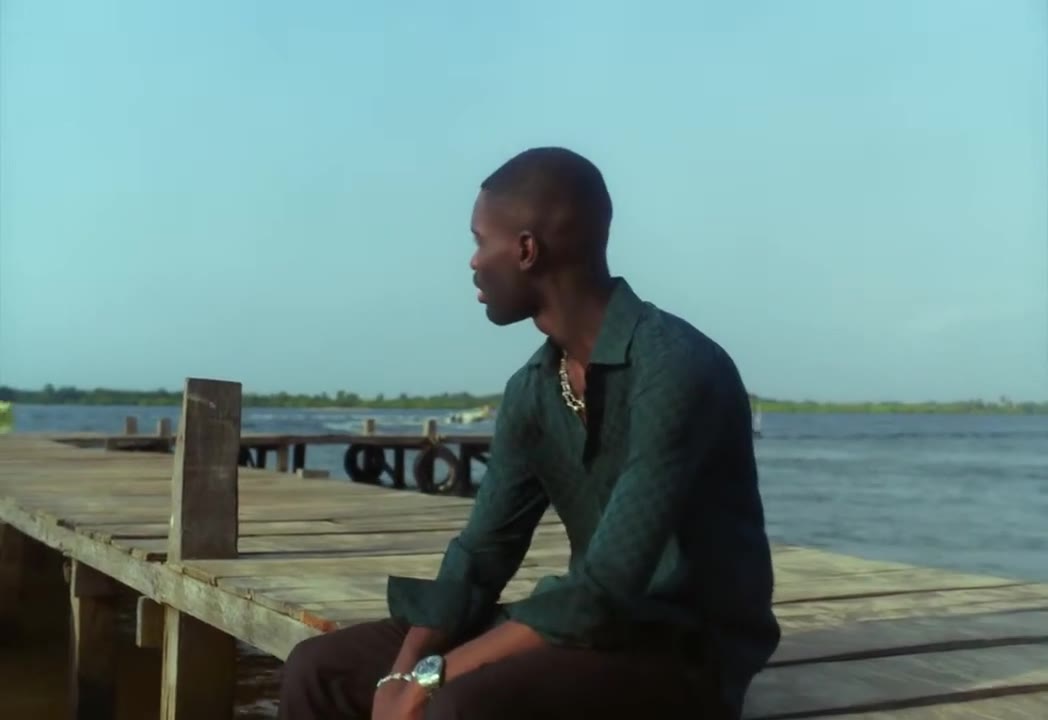
Use one clear photo per person: one in the male slot and one in the female slot. Choose JPG, PNG or WebP, up to 10 MB each and at least 300 × 300 pixels. Use photos you have permission to use.
Preview Part 1, 2 or 3 and select 768P or 2K. Each part requests a 10-second video. Review the credit cost; there is no need to upload a reference or write a prompt.
When generation opens, sign in, add enough paid credits and confirm photo permission before submitting. Follow the task in My videos and download the completed MP4.
The goal is to replace the two performers while following your selected clip. Here is what guides the result and what still needs a real generation to verify.
The fixed prompt asks for the original outfits, scene, camera cuts, gestures and timing. Male and female identities stay assigned to their original roles as positions change. Solo close-ups remain solo shots.
Explore the reference and prompt controls ↗AI generates new frames, so faces, motion, framing and timing can vary. Exact reproduction and lip-sync are not guaranteed. The reference preview does not demonstrate the quality of a personalized result.
Joining parts and adding music happen in your own editor. Reference audio is audible in the preview, but the original recording is not promised in the download. Use music permitted for your intended use.
Start with the moment you like best. For the full sequence, generate the three parts separately with the same portraits and quality, then join the downloads in your video editor.
All three parts use 480 credits at 768P or 780 at 2K. There is no automatic stitching, and continuity between separate generations can vary.
How to join your three clips ↗Browsing the reference and preparing photos are free. Personalized videos use paid credits. The smallest listed pack is $9.90 for 320 credits; there is no subscription or free personalized generation.
320 credits
Try your first duet
700 credits
A complete sequence
1,500 credits
Room for more takes
3,100 credits
Best credit value
Each 10-second part uses 160 credits at 768P or 260 at 2K, including its 10-second reference. All three parts use 480 or 780 credits. Each part is generated and downloaded separately.
Purchases are closed while the generation service is being connected.
Confirmed technical failures restore reserved credits. A completed result you want to redo uses additional credits. Credit restoration is different from a cash refund. See full pricing and payment terms.
No free personalized generation is available. Watching the reference and preparing photos are free. The smallest listed pack is $9.90 for 320 credits, with no subscription. One 10-second part uses 160 credits at 768P or 260 at 2K. Purchases and generation are not open yet.
No. The studio provides a 30-second reference, three selectable 10-second sections and a fixed prompt. You only need two separate portraits, one for each template role.
Upload one portrait in the male slot and one in the female slot. The prompt assigns each identity to the corresponding performer throughout the reference, including cuts, position changes and solo close-ups. Use Swap uploaded photos if you put them in the wrong slots. The two people do not need to appear in the same original photo.
Yes. Choose Part 1 (0:00–0:10), Part 2 (0:10–0:20) or Part 3 (0:20–0:30). Each request uses the corresponding 10-second clip. For the full sequence, generate all three separately and join the downloads in an editor. All three use 480 credits at 768P or 780 at 2K. Automatic stitching and seamless continuity are not included.
The studio requests one 10-second MP4 per part in 16:9, with a choice of 768P or 2K. These are generation settings, not specifications verified from a completed output. Exact pixel dimensions, audio delivery and watermark details have not yet been confirmed. Completed videos will be available through your account in My videos.
The reference preview contains source audio. The soundtrack of a personalized result has not been verified, so the original recording is not promised as part of the download. The tool does not grant music rights. Use only music permitted for your account, region and intended use when editing or publishing.
No exact match is guaranteed. The selected clip and fixed prompt guide the same scene, original outfits, camera cuts, gestures and timing while replacing the male and female identities. AI can still change facial details, motion, framing and timing. The reference preview is not proof of the quality of a generated result.
No. The prompt asks the model to follow the reference mouth movements, but exact lip-sync, original vocals and audio synchronization are not verified or guaranteed.
You can watch the reference and prepare photos without an account. When generation opens, you will need to sign in and have enough paid credits before submitting. Photo drafts can be restored in the same browser for 30 minutes; My videos is the account-based entry for submitted jobs and downloads.
A reliable wait-time estimate is not available yet. Once generation opens, the studio will show the task status, and you can return to My videos to check a submitted job. No specific completion time is promised.
A confirmed technical failure restores the reserved credits once. If acceptance of a request is uncertain, the credits stay reserved while it is checked; do not submit the same job again. A completed result uses credits even if you dislike creative details, and another generation costs additional credits. Restoring credits is not a cash refund; see the Terms for payment conditions and statutory rights.
Before submission, previews and drafts stay in your browser. Local drafts expire after 30 minutes and are cleared on the next visit. Submitted photos go to private storage and a video processing provider. Site uploads become eligible for deletion after 24 hours, except photos needed by an unfinished task. Account deletion is available from your account page. External retention follows the provider’s policies; immediate deletion of every copy and a no-training policy have not been verified. See Privacy for details.
No. Raindance AI is an independent AI video tool and is not affiliated with or endorsed by Dave, Tems, their record labels or the Raindance Film Festival.
Who’s in your Raindance video?
Prepare your two portraitsUse photos you own or have permission to use. Raindance AI is an independent tool, not affiliated with Dave, Tems, their labels or the Raindance Film Festival.